
Features
Puhera Features
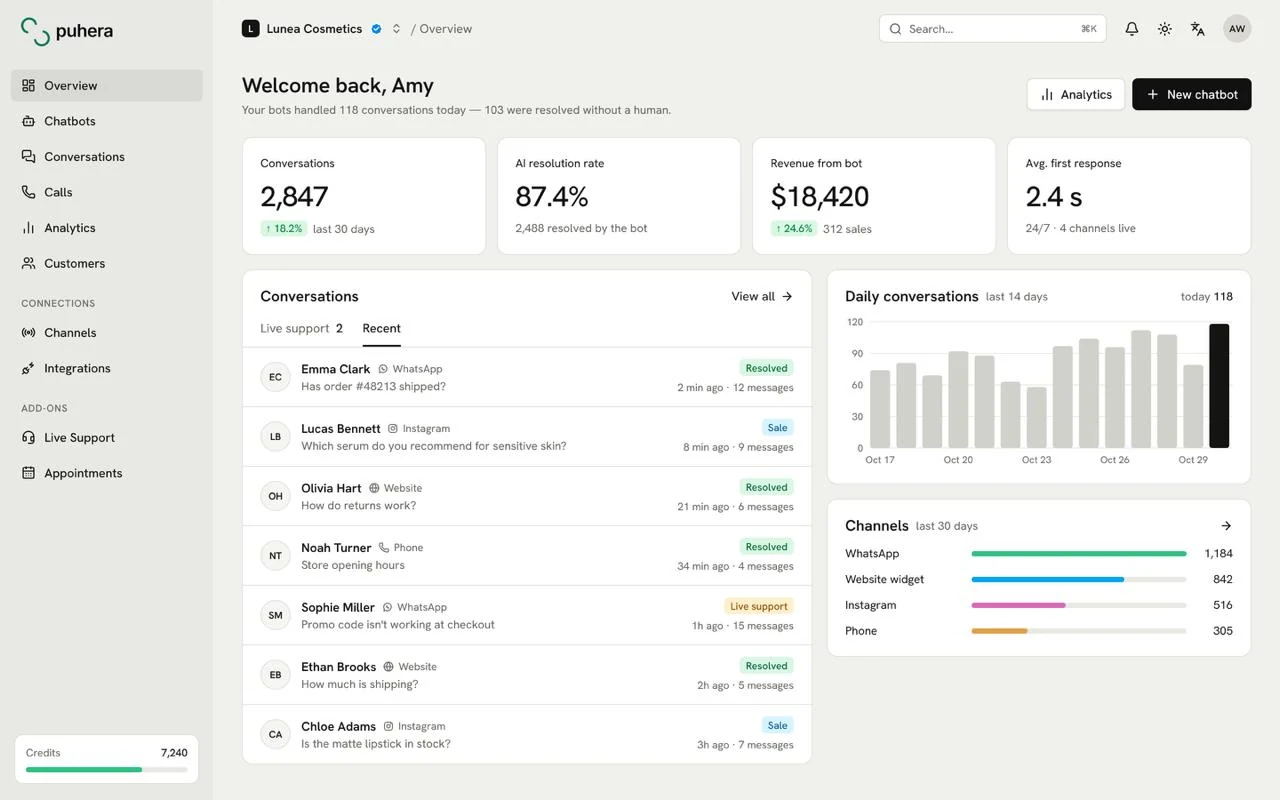
Puhera is a no-code AI chatbot platform for e-commerce and service businesses. It brings a cited knowledge base, visual automation, live agent handoff, ticketing, order lookup, lead capture, product recommendations and chatbot revenue tracking into one panel. The bot answers only from your own data, takes action when needed and reports the business result it drives.
All features
- AI knowledge base Learns from your site, files, FAQ and catalog; cites a source for every answer. Explore
- Chatbot automation Intent and keyword triggers for forms, e-mail, buttons and webhooks. Explore
- Live chat handoff Seamless handoff to an agent with a priority queue and the bot transcript. Explore
- Ticketing system Turn chats into tickets; track status, priority and assignee. Explore
- Revenue tracking Report chatbot-driven sales and the funnel with SKU-based attribution. Explore
- Order tracking Answer "where is my order?" from your store data. Explore
- Lead capture Show a form at the right moment and pass new leads to your team. Explore
- Product recommendations Recommend the right products from your catalog and measure the return. Explore
- AI phone assistant Talks to callers in a natural voice, gives information, looks up orders and books appointments. Explore
- AI appointment system Take bookings in chat and by phone; calendar, confirmations and reminders on autopilot. Explore
At a glance
- Setup No code; publish with a public link or an embed script
- Knowledge Website, files, FAQ and product catalog, with a source on every answer
- Actions Lead form, email, quick-reply buttons, webhook, agent handoff
- Measurement Conversion and revenue from product view to purchase
- Trial 7 days free, no credit card
What does a Puhera chatbot know?
The knowledge base is the foundation of Puhera. The bot generates answers from the sources you add and shows the source behind each answer (a citation), so both visitors and your team can see where it came from.
- Automatic crawling of your website
- PDF, Word, PowerPoint and text file uploads
- FAQ / knowledge base content
- Product catalog sync from a Google Merchant feed or T-Soft
Answers can be generated in many languages with AI. The AI knowledge base page covers how sources are connected.
What can the chatbot do on its own?
Puhera goes beyond answering questions. On the visual automation canvas you build a flow by picking a trigger (an intent is detected, a keyword appears, or every conversation) and an action.
- Lead capture: Collects contact details with a form from visitors who are close to buying or asking for a quote.
- Product recommendations: With a store integration, suggests products that match what the visitor needs.
- Order lookup: Answers "where is my order?" from your store data.
- Other actions: Sending an email, showing quick-reply buttons and making an external HTTP request (webhook) to your own systems.
See how order questions get automated on the order tracking chatbot page.
What happens when the bot is not enough?
Some conversations need a person. Puhera's live chat handoff passes the visitor to a real agent without leaving the chat.
- Visitors wait in a priority-ordered queue.
- The agent sees the transcript of the bot conversation before taking over, so the customer never has to start again.
- Messaging is real time with typing and read indicators, and agent capacity and status are managed for you.
The Enterprise plan adds a ticketing system: turn a conversation or a panel entry into a ticket and track it as open, pending, resolved or closed, with a priority and an assigned teammate. Learn more on the live chat handoff page.
How do you measure what the chatbot earns?
Puhera measures purchases of products the AI recommended. It ties product view, add-to-cart, checkout and purchase events together with a SKU-based attribution model.
- Summary, funnel and top-products reports
- Chatbot-attributed revenue, visible directly
That way you know not just how many questions the bot answered, but how much it contributed to sales. The chatbot revenue tracking page explains the model.
What do branding, team and security settings cover?
The bot should look like part of your brand. Logo, avatar, colors, corner radius, tone, welcome message and embed icon are all yours to set, and ready-made directive (persona) templates help you start fast.
- Multi-organization (tenant) support with per-organization plugin installation
- Owner / Admin / Editor / Viewer roles
- Domain restriction, embed-origin protection, visitor blocking and token-based API security
Which channels can I use it on?
You can use the Puhera chatbot on your website, on WhatsApp, on Instagram DM and on Messenger. Puhera is a Meta Tech Provider: we connect the Meta channels through Meta's official infrastructure.
For your website an embed script or a public link is enough. WhatsApp, Instagram and Messenger are trademarks of Meta Platforms, Inc.
Do I need to code to use Puhera?
No. You connect your knowledge sources, configure the bot in a visual interface and publish it with a public link or an embed script.
Can I see where the bot's answers come from?
Yes. Puhera shows the source behind every answer, so you can verify it and add missing information to the knowledge base.
Which plan includes live chat handoff?
Live support (agent handoff) is on the Pro and Enterprise plans. Lead capture also comes with Pro.
Which plan includes the ticketing system?
The ticketing system is part of the Enterprise plan, along with CRM integration, custom model connection, sentiment analysis and hiding the brand label.
Can the bot answer in more than one language?
Yes. Puhera uses AI to support visitors in different languages, and the Puhera team offers customer support in Turkish.
What are AI credits?
Credits are used to generate answers in chat. Starter includes 1,000 AI credits a month, and Pro includes 3,000 that renew every month.
Try Puhera with your own data.
Free for 7 days, no credit card. Connect your sources, test the bot in preview, and publish when you are ready.
Start your 7-day free trialNo credit card · No code · Live in 5 minutes