
Features
Chatbot Conversion & Revenue Tracking
Puhera conversion and revenue tracking measures whether the products your chatbot recommends actually sell. It tracks product view, add-to-cart, checkout and purchase events, and its SKU-based attribution model matches each purchased product to the chatbot's recommendation. Summary, funnel and top-products reports show chatbot-attributed revenue directly.
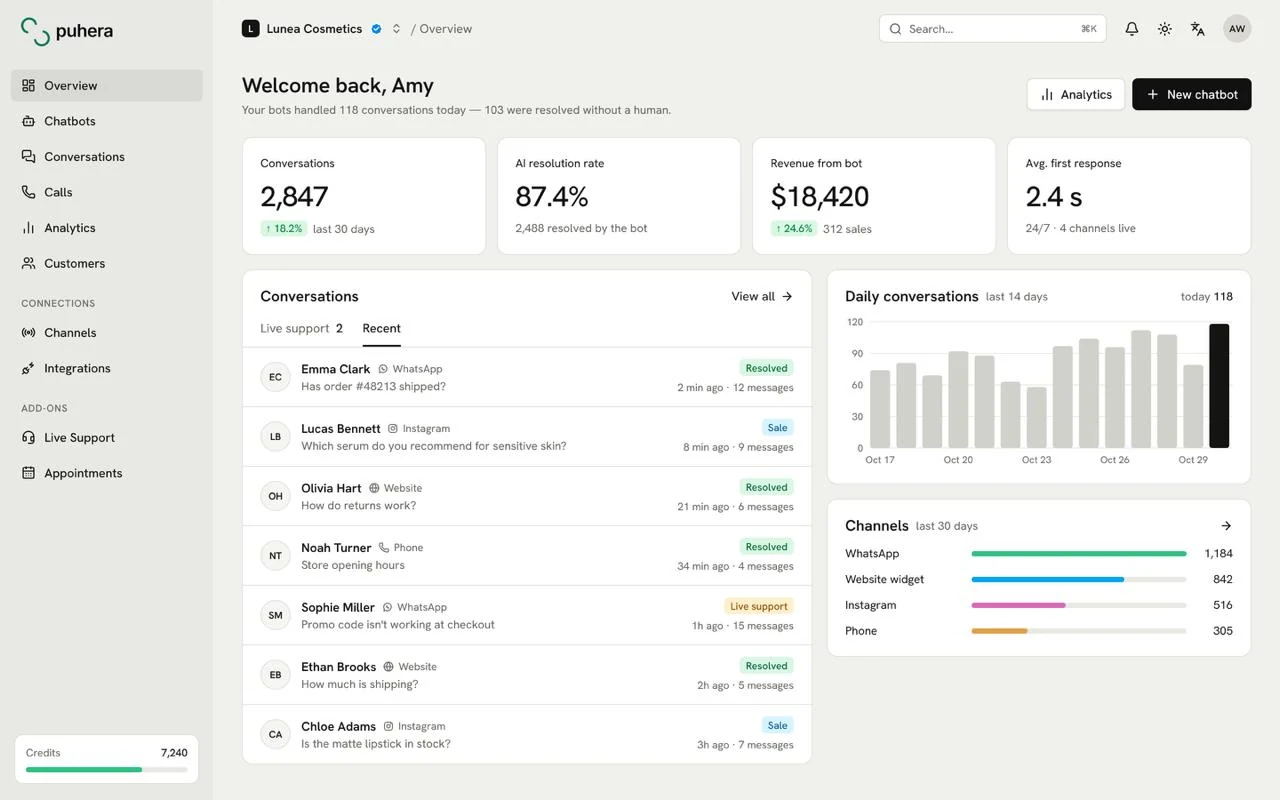
At a glance
- What it measures Purchases and revenue from products the chatbot recommended
- Tracked events Product view, add to cart, checkout, purchase
- Attribution model SKU-based
- Reports Summary, funnel, top products
How do you measure the revenue a chatbot brings in?
Counting answered questions says little about a chatbot's value. In e-commerce the real question is simpler: when the bot recommended a product, did the visitor buy it?
Puhera answers that with attribution, the rule that decides which touchpoint a sale is credited to. In Puhera the rule works at the product-code level, the SKU: when a purchased SKU matches a SKU the chatbot recommended, the sale is attributed to the chatbot.
Which events are tracked?
- Product view: The visitor opened the recommended product's page.
- Add to cart: They put it in their cart.
- Checkout: They moved to the payment step.
- Purchase: They completed the order.
Together these four steps form a funnel. Seeing where visitors drop off tells you where to start improving.
What questions do the reports answer?
- Summary report: The overall picture of chatbot-attributed revenue and conversions.
- Funnel report: How many visitors continue at each step from view to purchase.
- Top products: The products that sell best through chatbot recommendations.
Say a clothing store sees that recommended jackets get plenty of views but stall in the cart. It can add sizing and return details to its knowledge base so the bot answers those questions at the moment of doubt.
How does revenue tracking connect to product recommendations?
The sales being measured come from recommendations the chatbot makes from your product catalog. That's why revenue tracking pairs naturally with AI product recommendations: the catalog syncs from a Google Merchant feed or T-Soft, and Shopify and WooCommerce stores can connect through e-commerce integrations.
For more on the measurement approach, read our guide to measuring chatbot revenue and conversions.
What should you check for accurate measurement?
SKU-based attribution relies on the product codes in your catalog matching the sales records in your store. To trust the reports, check the following:
- Consistent SKUs: The same product should carry the same code in the catalog and in order records.
- Separate codes for variants: When each size and color has its own SKU, you can see which variant sold.
- All four events arrive: A missing step makes the funnel look worse than it is.
- An up-to-date catalog: If the bot recommends something you no longer sell, the funnel breaks at the first step.
- Before-and-after comparisons: When you update the knowledge base or a flow, compare against the previous period.
How do you set up chatbot revenue tracking?
-
Connect your product catalog
Use a Google Merchant feed, T-Soft or an e-commerce integration so the bot knows your products.
-
Turn on product recommendations
Let the bot suggest catalog products that fit what the visitor needs.
-
Configure event tracking
Make sure view, cart, checkout and purchase events from your store reach Puhera.
-
Test in preview
Walk a recommendation through end to end and check that the events show up in reports.
-
Review the reports regularly
Use the summary, funnel and top-products reports to improve your knowledge base and flows.
How does Puhera calculate chatbot-attributed revenue?
It uses a SKU-based attribution model: when a purchased product matches a product the chatbot recommended, the sale is attributed to the chatbot.
Which events are tracked?
Product view, add to cart, checkout and purchase events are tracked.
What reports are available?
There are summary, funnel and top-products reports, and they show chatbot-attributed revenue directly.
Do I need a product catalog for revenue tracking?
Yes, the measured sales come from products the bot recommends from your catalog. You can connect it through a Google Merchant feed, T-Soft, or the Shopify and WooCommerce integrations.
What decisions do the revenue reports help with?
The top-products report shows where the bot advises well. The funnel step where most visitors drop off hints at which questions your knowledge base doesn't cover yet.
What is a SKU and why does it matter?
A SKU is the stock code that identifies each product or product variant. Attributing at the SKU level shows, product by product, which recommendation a sale came from.
Try Puhera with your own data.
Free for 7 days, no credit card. Connect your sources, test the bot in preview, and publish when you are ready.
Start your 7-day free trialNo credit card · No code · Live in 5 minutes