
Features
Live Chat & Human Handoff
Puhera live chat seamlessly hands a visitor from the AI chatbot to a real agent the moment the bot isn't enough. The visitor enters a priority-ordered queue, the agent reads the bot transcript before taking over, and messaging runs in real time with typing and read indicators. Customers never have to repeat themselves. Live chat handoff is available on the Pro and Enterprise plans.
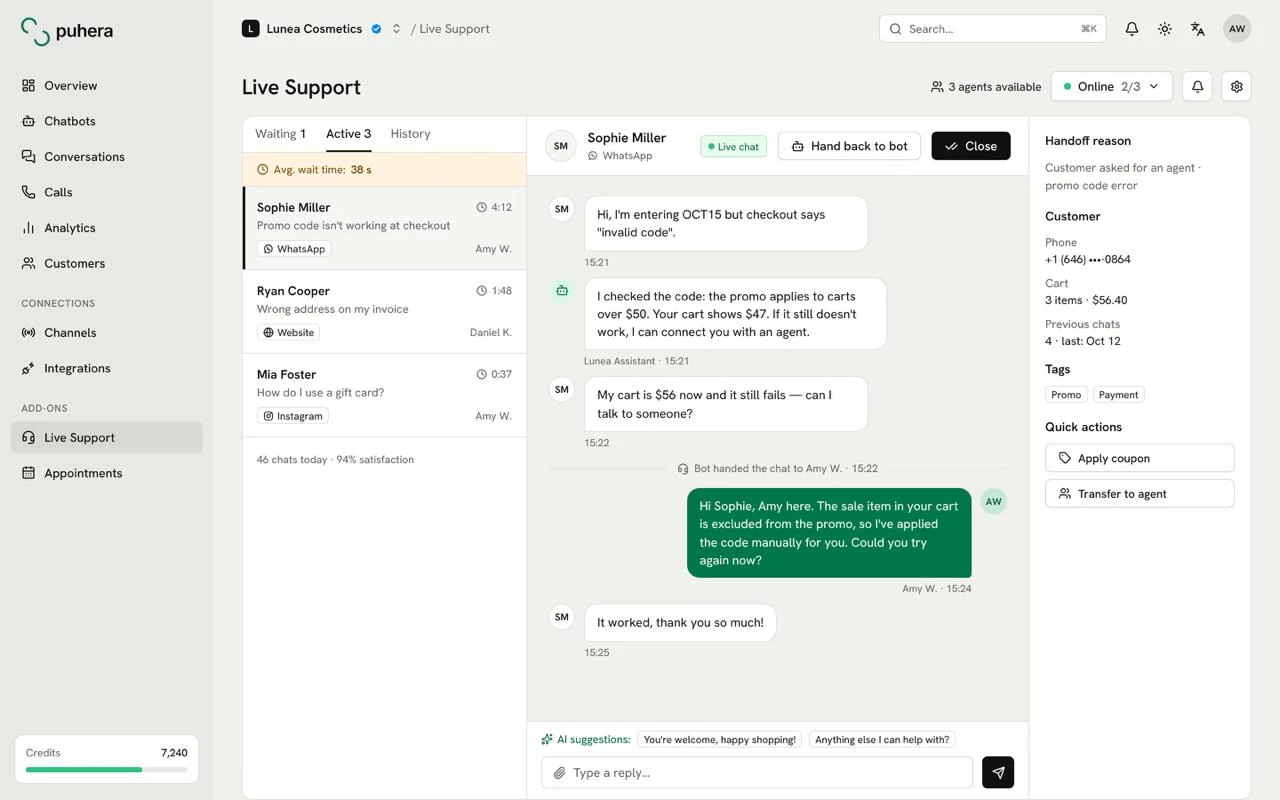
At a glance
- What it does Hands the visitor from the chatbot to a real agent without a break
- Queue Priority-ordered waiting queue
- Agent experience Bot transcript, typing/read indicators, capacity and status management
- Plans Pro and Enterprise
What is human handoff?
Human handoff is when a conversation moves from a chatbot to a person. In a good handoff, the visitor keeps chatting in the same window without friction, and the agent doesn't have to ask what the issue is from scratch.
In Puhera, the bot answers common questions from your knowledge base, then passes the conversation to your team when the visitor asks for a person or the topic needs a human decision.
When should the bot hand a conversation to an agent?
Not every question belongs with the bot. Handoff usually makes sense when:
- The visitor explicitly says "I want to talk to a person"
- The topic needs judgment, such as a complaint, a damaged item or a return exception
- The knowledge base has no answer to the question
- There's a sales opportunity, like a large order or a business quote
You can define these rules with visual automation: when an intent or keyword fires, the "connect to a live agent" action runs. See chatbot automation, and read chatbot-to-human handoff for help designing your scenarios.
What do agents get?
A handoff only works if it makes the agent's job easier. Puhera live chat gives your team these tools to handle conversations quickly and in order:
- Priority-ordered queue: Waiting visitors are ordered by priority, so urgent issues can move to the front.
- Bot transcript: Agents see the visitor's conversation with the bot before taking over and get straight to the point.
- Real-time messaging: Typing and read indicators make the conversation feel live on both sides.
- Capacity and status management: You control how many conversations each agent can take at once and their availability.
How does live chat work with the ticketing system?
Some requests can't be closed in a single chat: a return check, a technical investigation or another team's sign-off may be needed. On the Enterprise plan, you can create a ticket straight from the conversation and track it with open, pending, resolved and closed statuses, a priority and an assigned team member.
Learn more on the ticketing system page.
How do team management and security work?
You decide what each team member can do in the panel with Owner, Admin, Editor and Viewer roles. Visitor blocking handles abuse or spam, and domain restriction with embed-origin protection keeps the bot running only on your own sites. Your data is protected over a secure connection.
How do you set up live chat handoff in Puhera?
-
Choose Pro or Enterprise
Live chat handoff is included on the Pro and Enterprise plans.
-
Add your team
Invite the team members who will act as agents and set their roles.
-
Set capacity and statuses
Define how many conversations each agent can take at once and their availability.
-
Define handoff rules
In visual automation, choose which intents or keywords connect the visitor to an agent.
-
Test and publish
Run a full handoff scenario in preview, then publish the bot.
Which Puhera plans include live chat?
Live chat (agent handoff) is available on the Pro and Enterprise plans.
Can the agent see what the visitor discussed with the bot?
Yes. The agent sees the transcript of the bot conversation before taking over, so the visitor never has to explain the issue again.
What happens when several visitors are waiting at once?
Visitors enter a priority-ordered queue. Agent capacity and status management help spread conversations across available agents.
Is the handoff automatic or triggered by the visitor?
Both work. You can attach the "connect to a live agent" action to an intent or keyword trigger in visual automation, or show the visitor a button.
Do I need a separate live chat tool?
No. Live chat is built into Puhera; the visitor continues the conversation they started with the bot, now with your agent.
How do I follow up on requests that can't be solved in chat?
On the Enterprise plan, you can create a ticket from the conversation and track it by status, priority and assignee.
Try Puhera with your own data.
Free for 7 days, no credit card. Connect your sources, test the bot in preview, and publish when you are ready.
Start your 7-day free trialNo credit card · No code · Live in 5 minutes