
Features
Puhera AI Appointment System
The Puhera AI appointment system lets your customers book in the chat or over the phone. You define your services, staff and working hours; the assistant has the customer pick a service, a day and a time, the booking lands on the calendar instantly, and confirmation and reminder e-mails go out on their own. Double bookings are prevented.
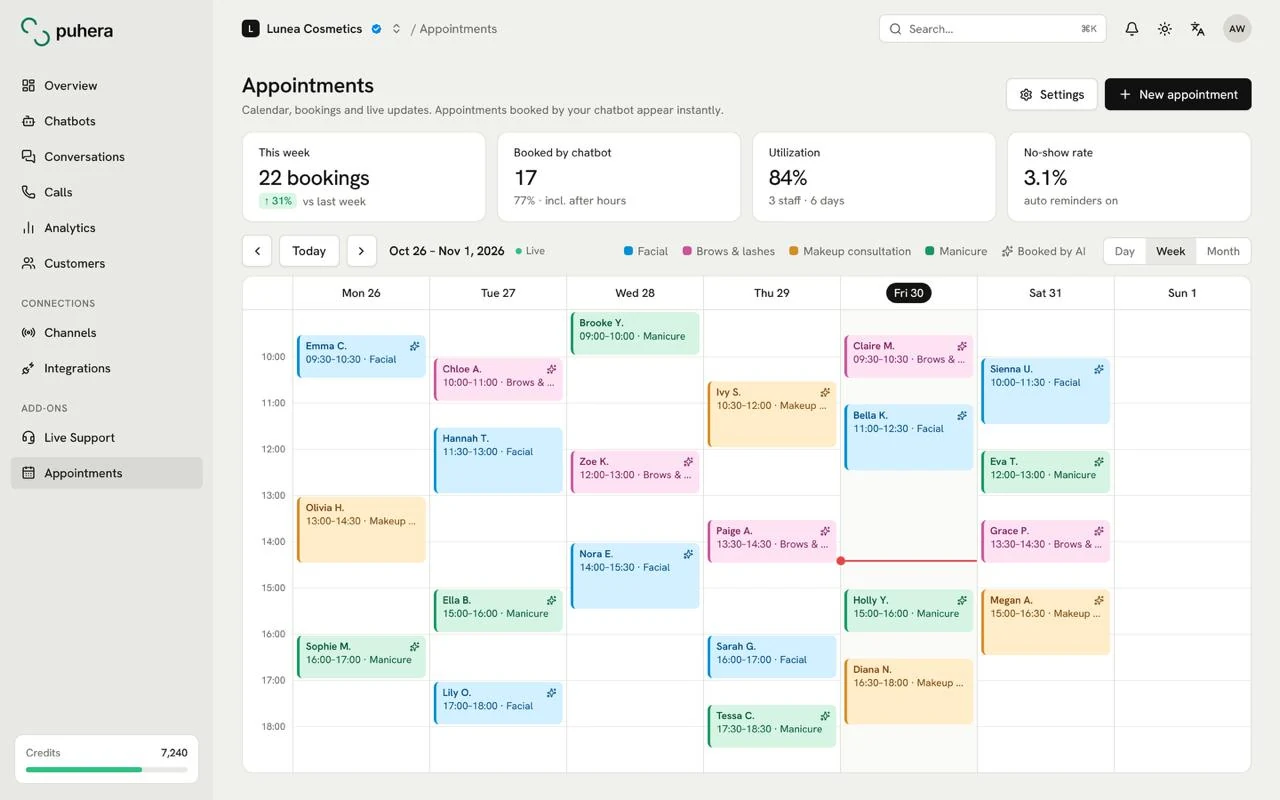
At a glance
- What it does Books appointments in chat and by phone and puts them on the calendar
- Setup Services, staff, weekly working hours, holidays and exceptions
- Notifications Confirmation, reschedule, cancellation and 24-hour / 1-hour reminder e-mails
- Protection Double bookings are prevented
Why do appointments end up scattered?
Booking requests pile up on the phone, in Instagram DMs, on WhatsApp and in a notebook at the front desk. Copying each one into the calendar by hand takes time and produces mistakes, and requests that arrive outside working hours wait until the next day.
The Puhera AI appointment system gathers those requests in one calendar. The customer books by typing or speaking, and you just look at the calendar.
How is an appointment booked?
In the chat a customer says, for example, "I'd like a haircut tomorrow." The assistant opens a service, day and time picker; when the customer chooses a slot, the appointment is created. Appointments can come in through:
- The chat assistant on your website
- The phone, through the AI phone assistant
- The booking form on your business page
- Manual entry from the panel or mobile, for requests that come in by phone
Define your services and working pattern
Set a duration and a buffer for each service, and limit the earliest and latest booking times. Define staff, weekly working hours, and holidays or exception days. The assistant offers only the slots that are really free, and double bookings are prevented.
Calendar, confirmations and reminders
The panel has a day and week calendar, and new appointments show up in real time. An appointment can be confirmed, rescheduled or cancelled. The customer gets a confirmation e-mail, and reminder e-mails go out 24 hours and 1 hour before, with a calendar file (.ics) attached. You can also track attended / no-show.
Reminders are currently sent by e-mail.
One assistant, every channel
The appointments add-on works alongside Puhera's other channels. To collect booking requests from WhatsApp, Instagram DM and your website, see chatbot automation, and to capture prospects see lead capture.
How do you set up the Puhera AI appointment system?
-
Define your services
Set a duration, a buffer and the earliest / latest booking time for each service.
-
Add staff and working hours
Enter weekly working hours, holidays and exception days.
-
Get the assistant ready for bookings
Turn on booking in your chatbot and, if you like, connect the phone channel too.
-
Book a test appointment
Create a test appointment in chat and (if enabled) by phone and check that it lands on the calendar.
-
Go live and follow the calendar
Track appointments in the panel and mark attended / no-show.
How does the chatbot book an appointment?
When a customer asks for an appointment in the chat, the assistant opens a service, day and time picker. Once the customer picks a slot, the appointment is created and lands on the calendar instantly.
Can appointments be booked over the phone?
Yes. Together with the appointments add-on, the AI phone assistant can create appointments over the phone.
Which reminders are sent?
Reminder e-mails go out 24 hours and 1 hour before the appointment. Confirmation, reschedule and cancellation e-mails are sent too. Reminders are currently delivered by e-mail.
Can double bookings happen?
No. The system prevents double bookings, and the assistant offers only slots that are really free.
Can I enter an appointment that came in by phone?
Yes. You can enter appointments by hand from the panel or from mobile.
Can I try Puhera for free?
Yes. You can try it free for 7 days with no credit card, just email verification; the trial has a lower credit limit and a few other limits.
Try Puhera with your own data.
Free for 7 days, no credit card. Connect your sources, test the bot in preview, and publish when you are ready.
Start your 7-day free trialNo credit card · No code · Live in 5 minutes