
Integrations
Puhera Integrations
Puhera integrations connect your AI chatbot to the store and business tools you already use. Puhera offers a native T-Soft integration, MCP connections for Shopify, WooCommerce, Notion and Calendly, product catalog sync from a Google Merchant feed, and a webhook integration for JivoChat. The result is a bot that knows your products, looks up orders and answers from your own data, all set up without code.
All integrations
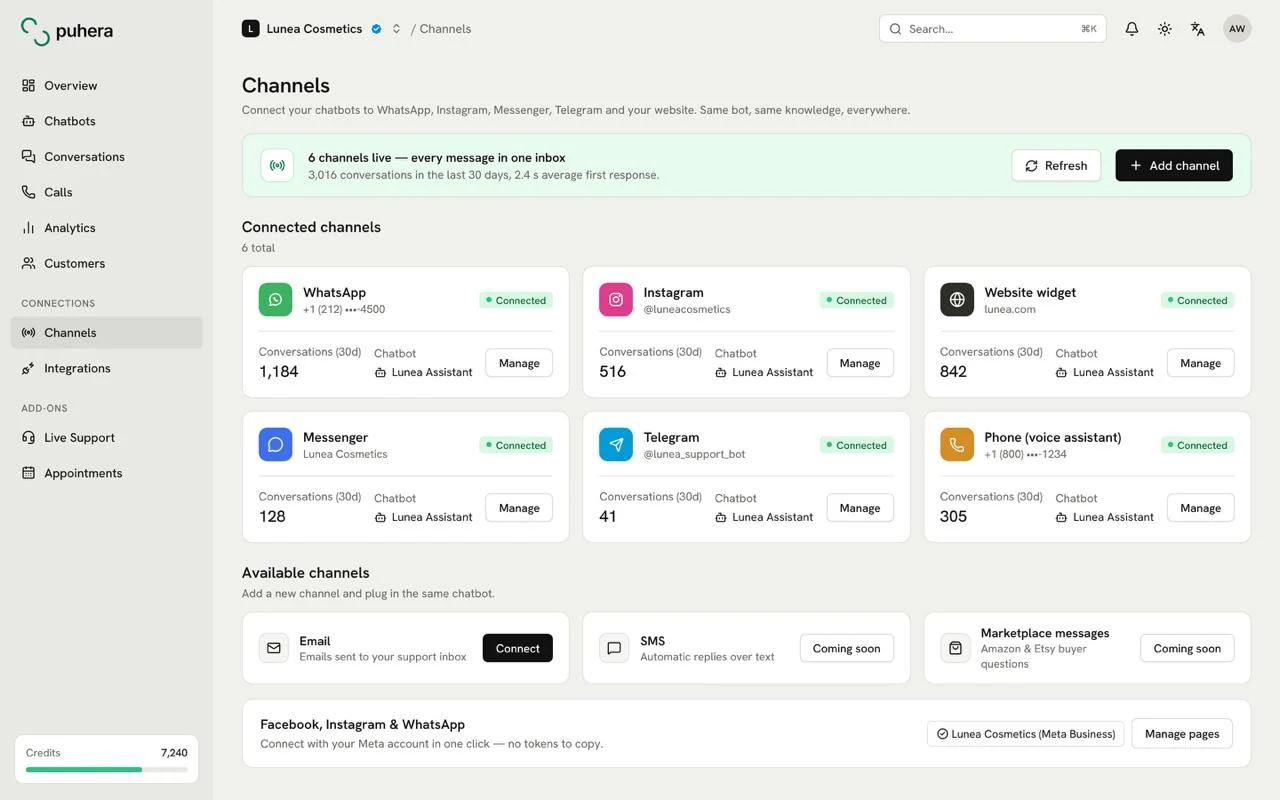
- WhatsApp Answer from your knowledge base, with sources, in the app your customers use most. Explore
- Instagram DM Answer messages that arrive on Instagram from the same knowledge sources. Explore
- Messenger Meet the messages sent to your Facebook page in Messenger. Explore
- Telegram Run your assistant as a Telegram bot; option buttons fit Telegram. Explore
- Shopify Product questions, recommendations and order lookup — over an MCP connection. Explore
- WooCommerce Product, recommendation and order answers for your WordPress store — over MCP. Explore
- T-Soft Native integration: order lookup, customer verification and catalog sync. Explore
- Google Merchant Sync your catalog from your product feed so the bot knows your products. Explore
- Notion Make your Notion pages a live knowledge source for the bot over MCP. Explore
- Calendly Guide visitors from the chat into your appointment and meeting booking flow. Explore
- JivoChat Connect the Puhera assistant to your existing JivoChat setup via webhook. Explore
At a glance
- Native integration T-Soft (order lookup, customer verification, catalog sync)
- MCP connections Shopify, WooCommerce, Notion, Calendly
- Feed and webhook Google Merchant product feed, JivoChat webhook integration
- Which plan? E-commerce and MCP integrations are on Pro and Enterprise
What does Puhera connect to?
Puhera uses three kinds of connections to extend what your chatbot knows and what it can do. Each one solves a different problem, and a single store can combine them.
- Native integration: For stores running on T-Soft, Puhera handles order lookup, verifies the customer before sharing order details, and syncs the product catalog.
- MCP connections: Shopify, WooCommerce, Notion and Calendly. The bot reaches the data in these tools and performs the actions you allow, such as answering product questions, looking up orders or guiding a visitor toward a booking.
- Catalog feed and webhook: A Google Merchant product feed brings your catalog into the knowledge base. Teams already on JivoChat connect through a webhook integration.
On top of that, the external HTTP request (webhook) action on the visual automation canvas lets a conversation call your own systems. If your store runs on Shopify, the Shopify integration page is a good place to start; T-Soft merchants should see the T-Soft integration.
What is MCP, and how does Puhera use it?
MCP (Model Context Protocol) is an open protocol that gives AI applications a standard way to connect to external tools and data sources. Instead of a custom integration for every tool, the tool describes what can be done through an MCP server, and the chatbot uses those capabilities inside the conversation.
In Puhera, MCP servers are how you connect external data sources to your bot. In practice:
- With Shopify or WooCommerce, the bot searches products, recommends items and checks order status.
- With Notion, it draws on content your team keeps in Notion.
- With Calendly, it steers booking-related conversations to the right next step.
Once a connection is in place, you choose which actions the bot is allowed to take. For a deeper walkthrough, read what MCP means for chatbot integrations.
Which plan includes which integration?
Integrations unlock by plan:
- Starter: Knowledge base (file uploads and website crawling), FAQ / knowledge base integration and a public link. Store and MCP integrations are not included.
- Pro: MCP integrations (Notion, Calendly and more) plus e-commerce integrations (Shopify, WooCommerce, T-Soft) for product recommendations, order lookup and similar actions. Live support handoff and lead capture are also on Pro.
- Enterprise: Everything in Pro, plus CRM integration, the ticketing system, custom model connection and multi-organization support.
Not sure which plan fits? Start with the 7-day free trial. No credit card is needed, only email verification.
How is data protected when integrations are on?
Once a chatbot can reach store data, security settings matter. In Puhera these controls sit with you:
- Scoped access: You authorize access when you connect a tool, and you decide which actions the bot may take.
- Customer verification: With the T-Soft integration, the bot verifies the customer before it shares order details.
- Role-based access: Owner, Admin, Editor and Viewer roles control who on your team can manage integrations, and plugins are installed per organization.
- Publishing safeguards: Domain restriction, embed-origin protection, visitor blocking and token-based API security.
Does Puhera work with WhatsApp, Instagram DM and Messenger?
Yes. Puhera is a Meta Tech Provider, so you can use your chatbot on WhatsApp, Instagram DM and Messenger in addition to your website. These channels connect through Meta's official infrastructure.
- WhatsApp: Answer questions from your knowledge base in the app your customers use most.
- Instagram DM: Answer messages that arrive on Instagram from the same knowledge sources.
- Messenger: Meet the messages sent to your Facebook page in Messenger.
WhatsApp, Instagram and Messenger are trademarks of Meta Platforms, Inc.
Which platforms does Puhera integrate with?
Puhera connects natively to T-Soft, to Shopify, WooCommerce, Notion and Calendly through MCP, and to JivoChat through a webhook. It can also sync your product catalog from a Google Merchant feed.
What is the difference between an MCP connection and a native integration?
A native integration is built into Puhera for a specific platform, as with T-Soft. MCP is a standard protocol that lets the AI connect to external tools, and it is how Shopify, WooCommerce, Notion and Calendly connect.
Do I need a developer to set up integrations?
No. You connect your store or tool and authorize access, choose the actions the bot may take, test it in preview and publish.
Does the Starter plan include e-commerce integrations?
No. Shopify, WooCommerce and T-Soft integrations and MCP connections are on the Pro and Enterprise plans. Starter lets you build a knowledge base from files and website crawling.
Can I connect a system that is not on the list?
The external HTTP request (webhook) action in visual automation lets a conversation send requests to your own systems. MCP servers are another way to connect external data sources to the bot.
Do I have to pay to try an integration?
No. You can try Puhera free for 7 days without a credit card. The trial has some limits, and you are not charged unless you pick a plan.
Try Puhera with your own data.
Free for 7 days, no credit card. Connect your sources, test the bot in preview, and publish when you are ready.
Start your 7-day free trialNo credit card · No code · Live in 5 minutes