
Features
Order Tracking Chatbot
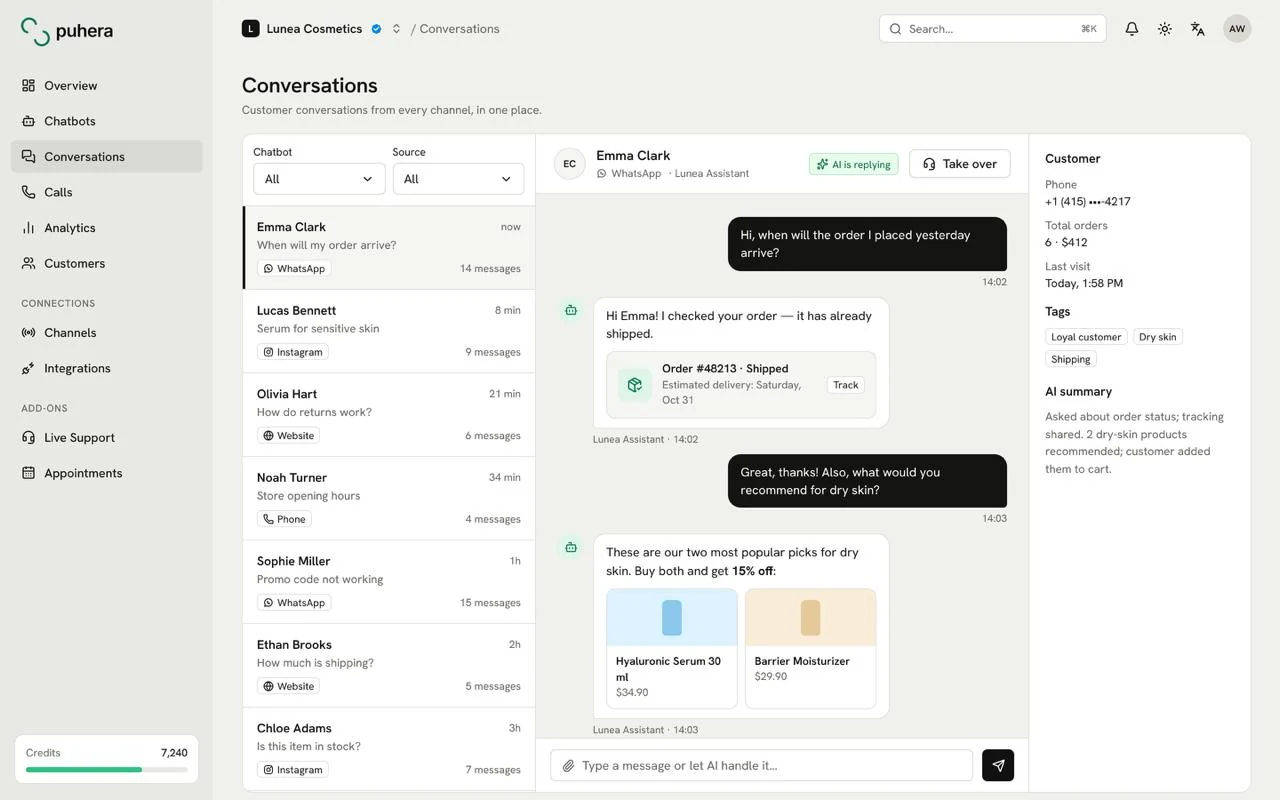
The Puhera order tracking chatbot answers "Where is my order?" without pulling in your team. With the T-Soft integration it looks up the order in your store system after verifying the customer, and Shopify and WooCommerce stores connect through e-commerce integrations. When the bot can't help, it hands the customer to a live agent. Available on Pro and Enterprise plans.
At a glance
- What it does Looks up the customer's order in your store system and answers in chat
- Platforms T-Soft (with customer verification), Shopify and WooCommerce
- Security With T-Soft, order details are shared only after customer verification
- Plan Pro and Enterprise
What does an order tracking chatbot do?
A large share of e-commerce support questions are about the same thing: where is my order, and when will it arrive? Each one is simple, but someone still has to open the admin panel and find the order.
A Puhera chatbot pulls that information straight from your store system. The customer asks in the chat window, the bot looks up the order and replies in the same conversation. Your team focuses on the exceptions.
What can customers ask?
- "Where is my order? Has it shipped?"
- "What's the status of the order I placed yesterday?"
- "Which items were in my order?"
- "How do I start a return?" (answered from your return policy page, with the source cited)
Exactly which order details the bot can share depends on the data your connected store system returns.
Is order information kept safe?
Order details are personal data, so verification matters. The T-Soft integration pairs order lookup with customer verification: the bot shares order details only after confirming that the person asking owns the order.
Shopify and WooCommerce connect through MCP (Model Context Protocol), a standard way for a chatbot to reach data in an external system in a controlled manner. You decide which actions the bot is allowed to take.
Domain restriction, embed-origin protection and visitor blocking help make sure the bot serves only your site and the people you want it to.
What happens when the bot can't answer?
A delayed shipment or a wrong item needs a person. With live chat handoff, Puhera moves the customer through a priority queue to an agent, who sees the bot conversation before taking over, so the customer never has to repeat their order details.
For more scenarios, see our guide on how to automate order status questions.
What should you check before going live?
Order lookup touches one of the moments when customers are most sensitive. Run through this list before you publish the bot:
- Are your policies in the knowledge base? Add shipping times and return and exchange terms so the bot can handle post-order questions too.
- Is the handoff rule clear? Use automation so the bot passes delays, damage or wrong items to an agent.
- Have you tested verification? Confirm that a lookup with the wrong details doesn't reveal any order information.
- Does the welcome message point the way? A line like "I can look up your order" tells customers right away what the bot can do.
How do you set up an order tracking chatbot?
-
Choose Pro or Enterprise
E-commerce integrations are included in the Pro and Enterprise plans.
-
Connect your store
Connect your T-Soft, Shopify or WooCommerce store and authorize access.
-
Set the bot's permissions
Choose which actions the bot may take and when it should hand off to an agent.
-
Test in preview
Run the verification and lookup flow end to end with a real order.
-
Publish
Add the bot to your site with the embed script or share it with a public link.
Which platforms can Puhera look up orders on?
The T-Soft integration offers order lookup with customer verification. Shopify and WooCommerce stores can also be connected for order lookup through e-commerce integrations.
Is order information shown to anyone who asks?
No. With the T-Soft integration, the bot shares order details only after verifying the customer.
Which plan includes order lookup?
E-commerce integrations are part of the Pro and Enterprise plans.
What if the bot can't solve the problem?
The bot can hand the customer to a live agent, who sees the conversation with the bot before taking over.
Does the bot answer questions beyond orders?
Yes. The same chatbot answers shipping, returns and payment questions from a knowledge base built from your website and uploaded files, citing the source. Customers can check an order and get other answers in a single chat window.
Do I need to write code to set it up?
No. You connect your store, choose the bot's permissions and publish it with an embed script or a public link.
Try Puhera with your own data.
Free for 7 days, no credit card. Connect your sources, test the bot in preview, and publish when you are ready.
Start your 7-day free trialNo credit card · No code · Live in 5 minutes